

Random AI clips waste credits fast. Identity drifts. References fight each other. A short scene that should feel directed ends up as noise—because the brief never named what should stay fixed and what should move.
Learning how to make videos with Seedance 2.0 does not require a heavy studio stack. On Seedance 2.0, you can steer a 4–15 second scene with text plus optional image, video, and audio references, bind each asset with @ mentions, choose first-and-last-frame continuity when start and end must lock, optionally generate sound in the same pass, check a credit estimate, then review takes in My Creations—one deliberate change at a time.
In this guide, we cover what you can make with Seedance 2.0, the step-by-step generate flow, a reusable prompt formula, and professional tips—multimodal @ roles, multi-beat planning, optional audio, and credit-smart revisions.
What You Can Make with Seedance 2.0
Most day-to-day Seedance work falls into a few practical categories. Each one benefits from clear roles for references and a single readable beat.
Figure 1. Sample clip — one readable Seedance 2.0 product beat. Play the video above to review the movement.
Product and brand short shots
Use Seedance when a product, package, or logo must stay recognizable while the camera and light move.
- Hero product push-in. Lock the bottle or device from a still, then ask for a slow orbit and a quiet ending hold.
- Packaging turn. Keep silhouette and label intact; let one fingertip or turntable motion sell the form.
- Lifestyle insert. Keep brand identity from an image; describe only the hand action and ambient sound.
Character-consistent short scenes
When a face, wardrobe, or mascot must survive motion, lead with references and keep the text focused on action.
- Same character, one beat. Bind a face still as
@Image1, then write one clear action and camera path. - Wardrobe continuity. Separate identity from style: one image for the person, another for the look if needed—never two competing faces.
- Dialogue glance. Short line, who speaks, and a simple over-the-shoulder move so pacing is readable in a few seconds.
Rhythm and performance beats
Seedance’s multimodal path helps when timing, gesture, or sound must land together.
- Gesture-led hook. Use a short video reference for pacing; write the camera to follow the peak moment.
- Synced sound event. Name the click, whoosh, or room tone that lands with the action.
- Multi-beat micro-story. Plan beginning → development → ending hold inside 4–15 seconds—not a full edit suite, just a clear arc.
How to Make a Seedance 2.0 Video
Open Seedance 2.0 (or start from the home generator / AI video generator and select Seedance when available).
- Choose the mode that matches the brief. Text-first when the scene is still open. Image or multimodal reference when identity or motion must be locked. First-and-last-frame when start and end states must match approved art.
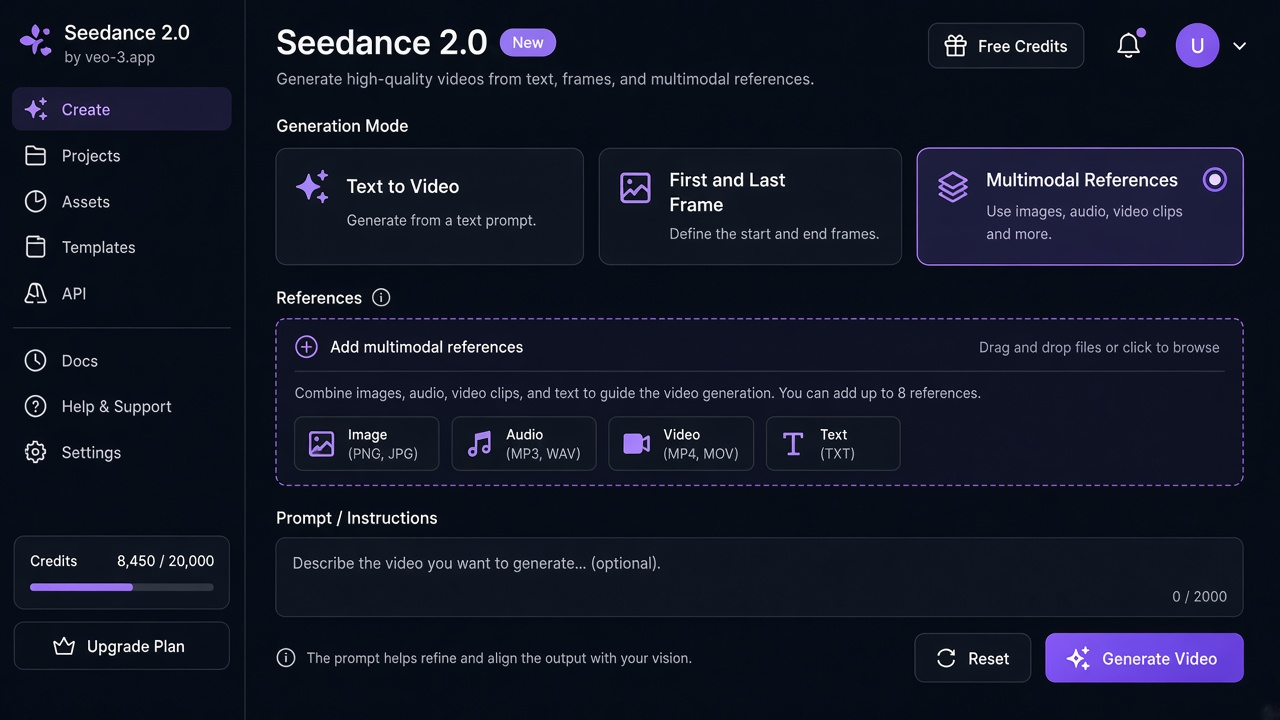
Figure 2. Sample UI illustration — pick text, first-and-last-frame, or multimodal before you upload references.
- Upload only what earns a role. In multimodal mode you can use up to nine images, three videos, and three audio files plus written instructions. Give each asset one primary job—identity, motion rhythm, or sound cue—not three jobs at once.
- Bind assets with
@mentions. Use labels such as@Image1,@Video1, and@Audio1so the prompt points at a specific file instead of hoping the model guesses.
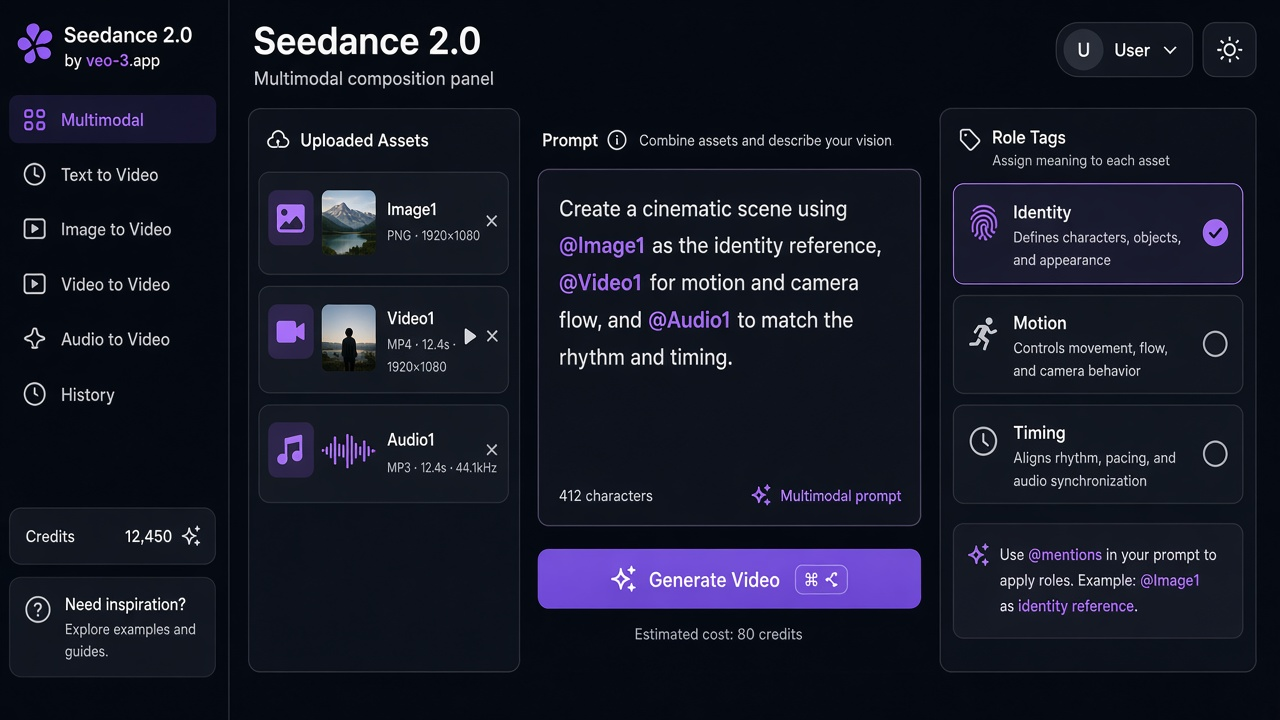
Figure 3. Sample UI illustration — bind each upload with @Image1 / @Video1 / @Audio1 so the prompt points at one clear role.
- Write one readable beat. Objective, actions, camera, lighting, ending hold, and any sound that matters—complete sentences beat keyword piles.
- Set duration and resolution from the options shown for that Seedance task (scenes run 4–15 seconds; pick resolution from what the UI offers, such as 480p / 720p / 1080p where listed).
- Decide on optional generated audio. If sound matters, describe it in the same prompt; if you are still learning motion, generate silent first, then add audio on a controlled revision.
- Read the credit estimate before you submit. Budget at least one deliberate revision for important shots. Plans and packs are on pricing.
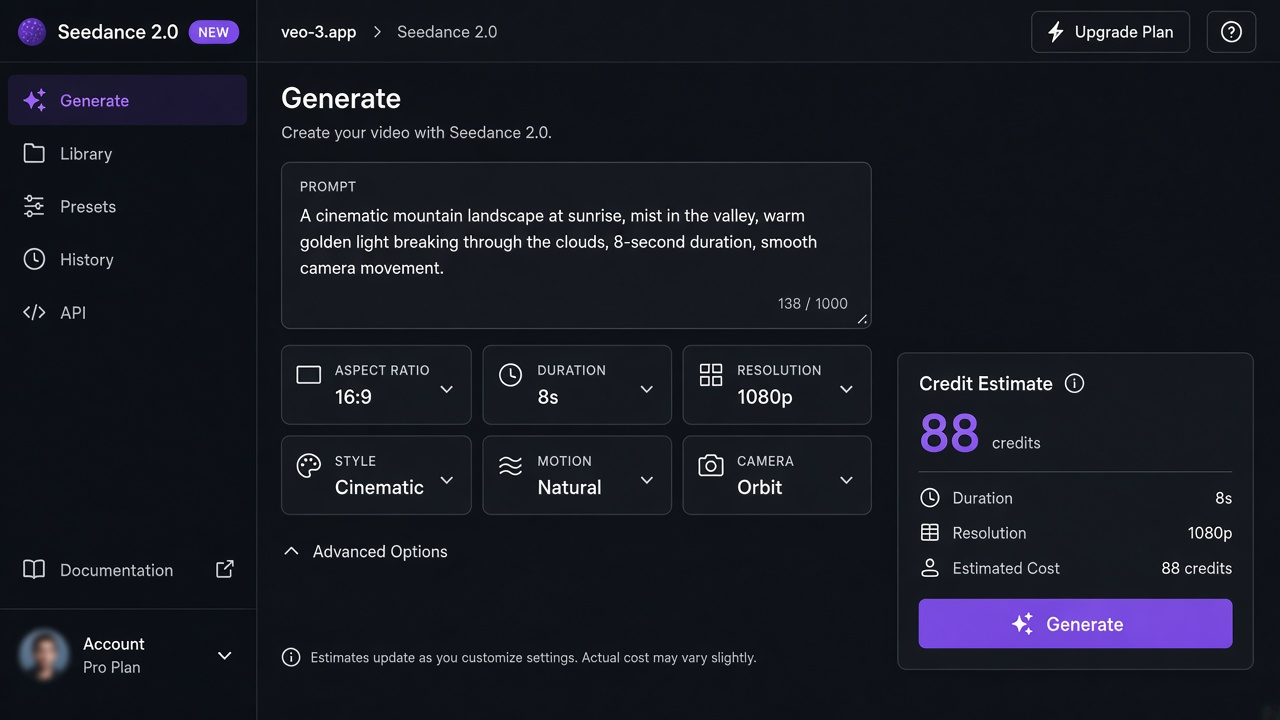
Figure 4. Sample UI illustration — check the credit estimate, then generate and review takes in My Creations.
- Generate, then open My Creations. Preview, compare takes, download winners, and note the single change you will try next.
A stronger habit than rewriting everything: change one instruction per take—camera, then sound, then action—so each credit teaches you something.
Prompt Formula and Templates
Use this structure every time you write a Seedance beat:
Subject / identity → Objective → Actions (in order) → Camera → Lighting → Ending hold → Sound (optional)
Master template
Using @Image1 as [identity role: keep silhouette / face / logo unchanged],
objective: [one outcome the viewer should feel].
Actions: (1) [beat start] (2) [development] (3) [resolve].
Camera: [move + speed] over [N] seconds.
Lighting: [key + mood].
End on a stable hold: [final framing].
Sound (optional): [ambience + one timed event].
Sketch A — product image-to-video
Using @Image1 as the product hero (keep logo, color, and silhouette unchanged),
objective: sell a clean beauty beat for a hero still.
Actions: (1) three-quarter close-up on a brushed steel table
(2) soft rim light blooms while a fingertip rotates the product a quarter turn
(3) settle facing camera.
Camera: slow push-in + slight orbit right over 8 seconds.
Lighting: cool key, warm practical in background bokeh.
End on a stable product beauty hold.
Sound (optional): low room tone, one crisp click when the product settles,
short airy whoosh under the orbit.
Sketch B — multimodal character + motion ref
Using @Image1 as the character face and wardrobe (preserve likeness),
and @Video1 only for gesture timing (not a second identity),
objective: one confident glance-and-turn for a short hook.
Actions: (1) character enters frame mid-shot (2) looks to camera
(3) turns and exits on the rhythm of @Video1.
Camera: gentle handheld follow, end on a clean medium hold.
Lighting: soft daylight, shallow depth of field.
Sound (optional): soft room tone, one footstep accent on the turn.
Keep prompts short when a strong image already carries identity. Name what should move; ask the model to keep everything else the same.
Professional Tips for Better Seedance Takes
Use these habits after the prompt formula: assign one job per upload, plan a micro-arc inside 4–15 seconds, add sound only when the picture holds, and revise one variable at a time.
Multimodal References and @ Binding
Seedance 2.0 is strongest when each upload has one job:
| Asset | Typical role |
|---|---|
| Image | Face, product, wardrobe, or style lock |
| Video | Motion, pacing, or camera rhythm |
| Audio | Timing, dialogue cadence, or atmosphere |
| Text | Story beat, camera path, lighting, sound events |
Rules that save credits:
- Do not upload two face images that disagree.
- Do not ask a motion reference to also reinvent identity.
- Mention the asset with
@in the sentence that uses it. - Prefer fewer, clearer references over a kitchen-sink stack.
First-and-last-frame mode is a separate choice when start and end must match approved frames. Multimodal reference mode is for mixed assets with @ roles. Pick one path that matches the brief; do not pile both without a reason.
Multi-Beat Planning Inside 4–15 Seconds
A short Seedance clip still needs an arc. Think in three beats, not a full timeline editor:
- Opening state — where we start (framing and subject).
- Development — the one action that matters.
- Ending hold or reveal — a stable finish the eye can rest on.
Write those beats in order in the prompt. If you need stricter continuity between approved art, use first/last frame mode and describe only the motion that bridges them. Do not expect a complete editing suite inside one generation—plan the micro-story the clip can actually hold.
When duration is flexible, draft at 6–10 seconds until identity and camera hold; stretch toward longer lengths only after the beat is stable.
Optional Audio and Synced Sound
When you enable optional generated audio, treat sound as part of the same brief:
- Name ambience (room tone, street hush, soft rain).
- Name one timed event that lands with the key action (click, whoosh, door).
- For dialogue, write a short line, who speaks, and the space (close mic vs. roomy).
If motion is still wrong, fix picture first on a silent or simpler pass, then add sound on the next controlled revision. Crowding the prompt with five sound events usually muddies the take.
Credits and Revision Habits
Every Seedance task shows a credit estimate before submit. Use it.
Practical habits:
- Learn the brief on a shorter duration and a resolution that matches the stage—not every experiment at maximum finish.
- Change one variable per revision: camera path, then action, then sound.
- Log winners in My Creations: prompt, mode, references used, and the single change that improved the take.
- For hero shots, budget a draft + motion fix + detail check. See pricing for plans and packs, and multiply by the concepts you actually expect.
Common mistakes: rewriting the entire prompt when one element failed; uploading competing identity refs; packing three storylines into eight seconds.
Less Guesswork, Clearer Short Scenes
You can now point Seedance 2.0 at a real brief: lock identity with references, write one readable beat, bind assets with @, plan a micro-arc inside 4–15 seconds, optionally add sound, then revise on purpose in My Creations.
AI video generation will not replace creative judgment. It gives you a fast loop to test motion and timing—but the story is still yours. Start with one Seedance scene: assign roles, write the beat, check the estimate, generate, and keep the take that works.
Ready to try it? Open Seedance 2.0, bring one clear reference set, and make the next short clip with a prompt the model can actually follow.
For Veo input modes and model tiers, read How to make AI videos with Veo 3.
FAQs
How do I make videos with Seedance 2.0?
Open Seedance 2.0, choose text, image, multimodal, or first/last-frame mode, upload references with one role each, bind them with @ mentions, write a complete beat, set duration (4–15s) and resolution, check the credit estimate, generate, then review in My Creations.
What is the best Seedance 2.0 prompt structure?
Use subject/identity → objective → ordered actions → camera → lighting → ending hold → optional sound. Complete sentences beat keyword bags. When a reference already locks identity, keep the text short and name only what should move.
How should I use @Image1 and other @ mentions?
Upload the asset, then mention it in the prompt with the matching label (@Image1, @Video1, @Audio1). Give each file one primary job—identity, motion rhythm, or sound—so references do not fight each other.
Can Seedance generate audio with the video?
Yes—optional generated audio is available as a promptable layer on supported Seedance tasks. Describe ambience and one timed event in the same brief. Fix picture first if motion is unstable, then add sound on a controlled revision.
How do credits and revisions work?
Each task shows an estimate before submit. Budget draft + motion fix + detail check for important shots. Compare plans on pricing, and base your math on the duration and resolution you actually use.
